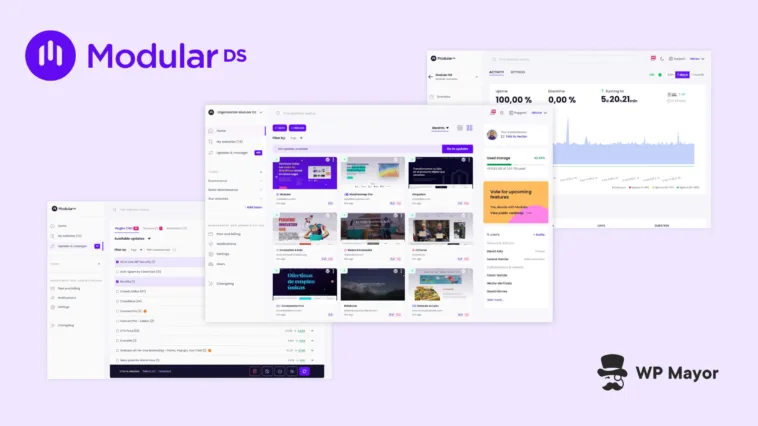
WordPress maintenance is one of those responsibilities that looks simple on paper. The moment you have more than a handful of sites to look after, though, it becomes complex. It’s easy to stack updates, backup schedules, and whatever else you have on your plate until you have a toppling leaning tower. There’s hope for us all, however, as this Modular DS review will show you! Let’s get into it!
Modular DS Review: Fast Facts
- Modular DS is a cloud-based WordPress maintenance platform for agencies and freelancers managing multiple client sites from one dashboard.
- The platform covers updates, backups, uptime monitoring, security scanning, database optimization, and automated client reporting.
- The pricing allows for flexible overage, which you can utilize in a smart way to keep your costs down.
Modular DS Review: Plans and Pricing That Scale With You

First off, Modular DS offers a 14-day free trial that gives you access to all paid features from day one. After the trial, your account will stay active but most functionality won’t be available to you. The four tiers scale by a number of factors:
- Freelance. Up to 10 websites, one user, 25 GB storage, 15-minute uptime monitoring, and more.
- Starter. Up to 35 websites, 3 users, 100 GB storage, 5-minute monitoring, and daily backups.
- Business. Up to 75 websites, 5 users, 250 GB storage, 2-minute monitoring, daily backups, plus Slack and Discord alert channels.
- Enterprise. Up to 125 websites, ten users, 500 GB storage, daily backups, 2-minute monitoring, and longer backup retention.
All plans include flexible overage, which means you can exceed your base limits and pay for the additional usage monthly without committing to a higher tier. If you’re building a care plan portfolio that grows in bursts, this will remove the pressure of forced tier upgrades.
An average freelancer site beginning with care plans will find the Freelance or Starter tiers the best fit. The Business and Enterprise plans will likely turn your head once you bring in staff, manage hundreds of sites, or need tighter uptime alerting.
Modular DS Review: The Benefits of Centralized Maintenance
Fragmentation is the key with Modular DS. A typical WordPress maintenance setup involves logging into each site individually, keeping track of what’s been updated across a spreadsheet, and piecing together reports from multiple sources.

Modular DS replaces all of that with a single dashboard where every site is visible at a glance. For an agency that runs 30 or 40 client sites, the time saving here is immediate.
Also, consider that clients rarely see the work that goes into keeping a WordPress site secure and up to date. It can make care plans a difficult sell. However, Modular DS generates branded maintenance reports that document updates, backups, security scans, and performance data. As such, you can give clients a record they can actually read and a clearer picture of what their retainer covers.
Modular DS Review: Core Functionality Worth Knowing About
Don’t be fooled: Modular DS isn’t a ‘bulk update’ button wrapped in a shiny interface. There are plenty of goodies inside, such as Update Copilot: an AI-powered risk score. This rates each pending update through looking at code changes, a plugin’s reliability history, and how the latest version has performed for other users. You get a clear sense of both routine updates and those that warrant caution before you apply anything.

Modular DS creates a restore point before any update runs. You can then compare before-and-after screenshots of the live site and roll back if there’s an unexpected change. For anyone who has spent an evening debugging a site after a plugin update went wrong, this could make your maintenance workflow much smoother. As an aside, restore points and backups run on EU servers, live in the cloud, and are scheduled.
Sitting alongside these is Smart Automated Updates. This lets you set rules that determine when updates fire rather than run updates on a blind schedule. So, a plugin update might only run if its Update Copilot risk score clears a threshold you define, if enough days pass after a version release, or even if it’s a minor release. What’s more, you can trigger an immediate update if there’s a vulnerability in the meantime. I’d be happy to trust this kind of automation.

However, there’s lots more under the Modular DS hood:
- You can clean up post revisions, spam comments, transients, and orphaned tables without installing an extra plugin.
- Uptime monitoring runs around the clock with real-time alerts when a site goes down and configurable alerts.
- Vulnerability scanning runs through a Patchstack integration and flags issues up to 48 hours before public disclosure.
- The extra-cost Patch and Protect add-on applies virtual patches at the PHP level to block known exploits before an official fix is released.
- You’re able to build maintenance reports that pull together updates, backups, security data, and performance metrics into a document you can send to clients. The global reporting feature lets you generate and schedule these across multiple sites at once, with Google Analytics, Search Console, WooCommerce, and PageSpeed integrations pulling in the data automatically.
As far as I can see, Patch and Protect is the only premium add-on Modular DS has, and at around $2.50 per month, I’d recommend it.
Modular DS Review: How to Set Up Your First Site
Connecting your first site is a quick process. After signing up, there are two ways to connect sites:
Honestly? Either option is going to be good, so you can choose whichever one fits your workflow.

Once you connect a site, it appears in your main dashboard with an at-a-glance summary of its update status, uptime, last backup, and any active security alerts.

Using Modular DS is super straightforward: you see health indicators along the top that you can click into and discover more about your site. Depending on the screen, you’ll (of course) see different information. For instance, all of the update information is collected in one place:

In what might come across as lazy, I don’t feel I have to explain too much about how to use the dashboard because everything is so intuitive. This is a definite positive. I also feel tools and services such as this are doing a good job if you don’t need to be in the dashboard very much. In this case, you could be in and out within seconds per site!
Modular DS Review: Support and Documentation Quality
Modular DS provides support in both English and Spanish across email and live chat. The support team has years of WordPress experience and priority support is included across all paid plans. You can find support in two places. The easiest is to look for the live chat icon in the bottom right-hand corner of the screen:

However, you can also head into the Help Center then scroll to the bottom of the page to find the support options:

For self-service help, the Modular DS documentation covers the platform’s full feature set with step-by-step articles and screenshots throughout.

The organization is clear and is split into logical categories. I found the depth here to be solid. While I found screenshots missing for some docs and a few pages that haven’t been updated in a long time, this isn’t actually a problem. This is because in the same way the Modular DS team gives updates due care and attention, they are also doing that with the documentation. It’s great to see a team treating its docs as just as important as the tools.
Modular DS Review: What Real Users Say About the Platform
I like to look at independent review platforms where possible to see how a tool performs for users over time. Modular DS has a 5/5 star rating on WordPress.org, positive reviews on Trustpilot, solid feedback from AppSumo users, and a 4.9 out of five rating on G2.

Reading some of the reviews, I noticed some recurring themes. For example, one review discusses how Safe Updates gives them “incredible peace of mind,” noting that the team is “approachable, quick, and always listening to the users.”
The support also gets plenty of column inches:
“…Support is incredibly fast at providing answers and solutions when facing an issue.” – Davey S.
Generally though, the experience of Modular DS wins the day:
…convenience, convenience, and once again – CONVENIENCE. I have access to our clients’ website management in one place, which saves me a ton of time. The best website maintenance solution we’ve ever used – after testing, the only one… – Sebastian S.
There were some minor criticisms, such as there being no external backup support. However, it’s worth pointing out that there were very few negative reviews in my research for this post. That is arguably the best pat on the back a company can receive from a customer or reviewer!
My Final Thoughts on Modular DS
Modular DS covers the full WordPress maintenance cycle in one place (updates, backups, monitoring, security, and client reporting) without requiring you to stitch together multiple tools to get there. The Update Copilot and Safe Updates combination alone solves one of the more stressful aspects of multi-site maintenance. The client reporting tools give your care plan a way to offer a professional foundation to your own customers too.
The pricing is solid, with good scalable structure, and the flexible overage model means you’re not pushed into a higher tier before you’re ready. If you manage a portfolio of client sites and want a maintenance platform that also helps you communicate the value of that work, the 14-day trial is a practical place to start.
Related Articles
Does this Modular DS review give you a clearer picture of what a maintenance platform can do for your WordPress workflow? I’d love to hear your thoughts in the comments section below!